Capture. Annotate.
Transcribe & Explain with AI
BerryShot is the ultimate screen capture utility for macOS. Take instant screenshots, sketch annotations pixel-perfect, OCR extract text offline in 0.1s, transcribe meetings in real-time with Deepgram or OpenAI Whisper, and generate AI summaries with one click.
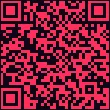
Scan to Download
Scan QR code using your phone camera to download the .dmg package directly.
Download DMG File →100% Offline & Private
Local OCR runs directly on device via Apple's Vision Framework. Images are never uploaded to servers.
AI Explainer & Translate
Connect to Claude or ChatGPT in seconds. Instantly explain algorithms, extract code snippets, or draft summaries.
Live Meeting Transcription
Stream speech-to-text live via Deepgram Nova or OpenAI Whisper. Generate AI meeting summaries with one click.
Lightweight & Native
Designed natively using Apple SwiftUI for macOS 14.0+. Runs silently in your Menu Bar with zero battery drain.
See the Actual App in Action
Click the buttons on the floating BerryShot toolbar at the bottom of the code snippet below to interact with actual features of our app.
2
3
4
5
6
7
8
9
10
11
12
13
14
15
import Vision
public class OCRService { public func extractText(image: CGImage) async -> String { // Initialize request handler locally
let request = VNRecognizeTextRequest { req, err in guard let results = req.results else { return } let text = results.compactMap { $0.topCandidates(1).first?.string } print("Extracted text successfully")
} request.recognitionLevel = .accurate
return "BerryShot OCR"
} }
Designed to Maximize Your Workflow
Whether communicating with developer teammates, copying code snippets, or explaining layouts, BerryShot supplies a complete toolkit.
Pixel-Perfect Sketching and Annotation Tools
Never load heavy image editors again. Draw attention to errors, highlight key layouts, or redact information directly on your screen selection layout.
- Smooth freehand drawing and straight diagonal lines
- Add rectangles, circles, or outline regions
- Inject direction arrow guides and custom textual labels
- One-click "Clear All" button (next to Undo/Redo) to wipe all canvas drawings (undoable via ⌘Z)
Translate, Transcribe, and Transmit via AI
BerryShot does not just store pictures. It reads them. Turn screenshots into editable textual arrays instantly or run complex AI requests in milliseconds.
Native OCR in 0.1 Seconds
Utilizes Apple Vision libraries optimized for Apple Silicon chips. Fully localized, no internet connection required.
5 AI Providers Supported
Xiaomi Mimo, OpenAI, OpenRouter, Gemini, and Claude. Insert your API key and query models on the fly.
Configurable Output Language
Toggle default response parameters between English, Vietnamese, or Japanese. Output is formatted and ready to copy.
Screen Recording with Real-Time Transcription
Record your screen with HEVC codec at 60fps while BerryShot transcribes both microphone and system audio in real-time. Generate AI-powered meeting summaries with one click.
- HEVC 60fps recording with system audio + microphone
- Real-time speech-to-text via Deepgram Nova or OpenAI Whisper
- Dual-source transcription: mic (You) + system audio (Other)
Single Window & Multi-Window Batch Capture
Capture a single target window or every eligible window of a running application simultaneously via dedicated Apps/Windows tabs and global hotkey Cmd + Shift + 7.
- Dedicated selector with Apps and Windows tabs for precise target isolation
- Batch capture mode grabs all open windows of an app in one action
- Aspect-ratio-matched preview window with one-click Copy (⌘C), Save As, and Cloud Upload
Automatic On-Device & Manual Content Masking
Prevent accidental leaks of secure data, credit card details, API keys, or private contacts with manual toolbar masks and 100% offline automatic detection.
- Manual toolbar tool to draw blur, pixelate, or solid cover masks directly on capture
- Automatic detection of secure text fields, credit cards (Luhn-validated), API keys, emails, phone numbers, and custom terms
- Configurable strictness policies: Off, Suggest, or Required (Required blocks unverified captures outright)
Model Context Protocol for Local AI Coding Agents
Allow local AI assistants like Claude Code or Codex to inspect running apps, capture window state, and run guarded documentation sessions over private local IPC.
- Read-only tools: list running apps/windows, capture with redaction, fetch manifests with lazy high-res resource fetching
- Guarded documentation sessions locked to a single allowlisted application with strict UI action guardrails
- Persistent menu-bar session indicator showing target app, mode, elapsed time, and one-click Stop control
Designed Around Hotkeys
Designed to work asynchronously behind the scenes, BerryShot binds to shortcuts without blocking your desktop layout.
Select Region
Press the global shortcut to freeze display and draw selection rectangle.
Apply Annotations
Highlight errors with custom arrows, write text blurbs, or draw frames.
Run OCR & AI
Tap OCR to copy code instantly, or call AI to explain blocks.
Copy or Share Link
Files saved locally or uploaded to cloud storage. Shareable URL copied.
Frequently Asked Questions
Everything you need to know about setting up and configuring BerryShot.
Built By
BerryShot is built and maintained in the open. Say hi to the people behind it.


Elevate Your Screen Workflows
MACOS NATIVE UTILITY
Experience the best way to transcribe images, draw notes on snippets, and query AI models natively from your menu bar. Set up in less than 5 seconds.